
TradingView is widely considered to have the best charting interface in the industry.
- Industry-Leading Charting Interface
- Cloud-Based Accessibility
- Built-In Social Network
- Limited Full Automation
- Subscription Required for Advanced Features
- Broker Integration Depends on Availability
TradingView – The Ultimate Social Charting Platform
If you’ve spent any time in the trading world, you’ve likely heard of TradingView. Known for its powerful charting tools, social trading features, and clean web-based interface, TradingView has become one of the most popular platforms for Forex, stocks, crypto, and multi-asset traders worldwide.
Unlike MetaTrader or cTrader, TradingView is not just a trading platform — it’s a complete trading ecosystem combining advanced technical analysis, social networking, and broker integration.
In this guide, we’ll break down everything you need to know about TradingView in 2026.
What Is TradingView?
TradingView is a cloud-based charting and trading platform launched in 2011. It started as a charting tool but quickly evolved into a full trading environment.
Today, TradingView offers:
- Advanced charting tools
- Multi-asset market coverage
- Built-in economic calendar
- Social trading network
- Broker integration for live trading
- Custom scripting with Pine Script
It’s used by retail traders, professional analysts, and even institutional investors.
Key Features of TradingView
1. Best-in-Class Charting Tools
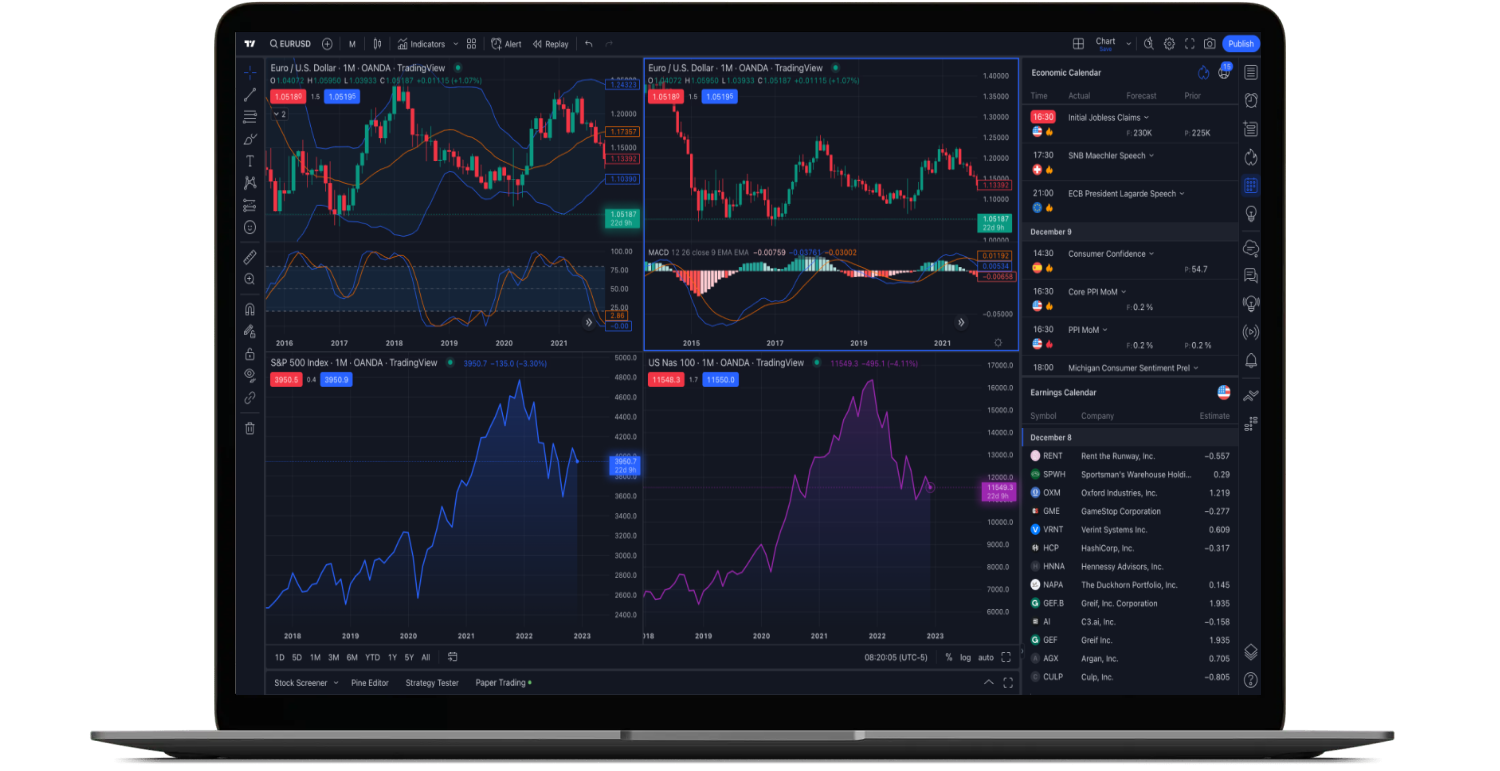
TradingView is widely considered to have the best charting interface in the industry.
Key features include:
- 100+ built-in indicators
- Thousands of community indicators
- 12+ chart types (candlestick, Heikin Ashi, Renko, Kagi, etc.)
- Multiple timeframe analysis
- Clean, modern interface
- Multi-chart layouts
Charts are fully customizable and extremely smooth, even on lower-end devices.
2. Cloud-Based Platform
Unlike MT4 or MT5, TradingView runs entirely in your browser.
Advantages include:
- No installation required
- Access from any device
- Automatic cloud saving
- Real-time synchronization
You can switch from desktop to mobile instantly without losing your chart settings.
3. Pine Script (Custom Indicators & Strategies)
TradingView uses its own scripting language called Pine Script.
With Pine Script, traders can:
- Create custom indicators
- Develop trading strategies
- Backtest ideas
- Automate alerts
While it’s not as powerful as C# or MQL for full automation, Pine Script is extremely intuitive and beginner-friendly.
4. Social Trading Network
This is where TradingView truly stands out.
Users can:
- Publish trading ideas
- Follow other traders
- Comment on charts
- Share strategies
- Build a public trading profile
This social layer makes TradingView part charting platform, part trading community.
5. Broker Integration
TradingView now integrates with many major brokers, allowing users to:
- Place trades directly from charts
- Manage positions
- Set stop-loss and take-profit
- Monitor open orders
This bridges the gap between analysis and execution.
Why Traders Love TradingView
TradingView is popular because it combines:
- Professional-level charting
- Modern UX design
- Cloud accessibility
- Social features
- Strong community tools
Many traders use TradingView for analysis even if they execute trades on MetaTrader or cTrader.
TradingView vs MetaTrader vs cTrader
Here’s how TradingView compares:
| Feature | TradingView | MT4 | MT5 | cTrader |
|---|---|---|---|---|
| Web-Based | Yes | Limited | Yes | Yes |
| Social Trading | Yes | No | No | Limited |
| Charting Tools | Excellent | Good | Very Good | Very Good |
| Automation | Pine Script | MQL4 | MQL5 | C# |
| Marketplace | Large | Massive | Growing | Moderate |
TradingView dominates in charting and community features, while MetaTrader and cTrader remain stronger for deep automation and broker compatibility.
Is TradingView Good for Beginners?
Yes — extremely.
TradingView is one of the most beginner-friendly platforms available because:
- The interface is intuitive
- No installation is required
- Thousands of tutorials exist
- Community ideas help learning
However, full automation is limited compared to MT5 or cTrader.
Who Should Use TradingView?
TradingView is ideal for:
- Technical analysts
- Swing traders
- Crypto traders
- Stock traders
- Traders who value visual clarity
- Traders who like social interaction
It’s especially popular among cryptocurrency traders due to its exchange integrations.
TradingView – Pros and Cons
✅ 3 Main Advantages
1. Industry-Leading Charting Interface
TradingView offers some of the most advanced and visually appealing charts in the market.
2. Cloud-Based Accessibility
Access your charts anywhere without installing software.
3. Built-In Social Network
Learn from other traders, publish ideas, and grow your audience.
❌ 3 Main Disadvantages
1. Limited Full Automation
Pine Script cannot fully replace advanced algorithmic trading environments like MT5 or cTrader.
2. Subscription Required for Advanced Features
Free plans have limitations on indicators, layouts, and alerts.
3. Broker Integration Depends on Availability
Not all brokers integrate directly with TradingView for execution.
Is TradingView Safe?
Yes. TradingView is widely used globally and implements strong security measures.
However, your funds are always held by your broker — not by TradingView itself.
Always verify your broker’s regulation and licensing before trading live.
Final Verdict: Is TradingView Worth It in 2026?
Absolutely.
TradingView has become the global standard for charting and technical analysis. While it may not fully replace MT5 or cTrader for heavy automation, it excels in:
- Visual analysis
- Social trading
- Multi-asset coverage
- Accessibility
Many professional traders now combine TradingView for analysis with MetaTrader or cTrader for execution.